Evolutionary War
Wesley Miaw <wesley@cs.unc.edu>
Peter Lorenzen
Table of Contents
1. Description
2. Installation
2.1 Requirements
2.2 The Game
3. Gameplay
4. Files
The original Evolutionary War is single machine shareware game developed by Phlogiston Software. It supports one- and two-player games for Mac OS (both OS X and Classic). It's very nice, polished, and you should check it out. The basic idea is to clone and mate your blobs to produce stronger blobs and kill off your opponents. You should take a look at their instructions for more information.
Our multiplayer distributed version of the game is not particularly polished, and was developed as a COMP 243 final project at The University of North Carolina at Chapel Hill. So it's more of an example of a distributed service than an example of a good game. But it does support two- to six-player games and will allow games to continue despite network failures or software crashes.
Our game was developed independent of the original Evolutionary War game and only shares the concept. We did not have access to the source code of the original, and all of the gameplay behavior programmed into our version was decided upon by ourselves to be somewhat similar to the observed behavior of the original and the gameplay description provided by Phlogiston Software. In other words, none of our code has any chance of looking like the code of the original, and all we stole was the idea.
2.1 Requirements
| Perl 5.8 (threads) |
The game uses Perl 5.8 with thread support. The Going Up? article by Sam Tregar has an introduction to Perl 5.8 threads and how to compile with thread support. |
|
| Perl/Tk |
The game uses Tk to display the GUI. Use CPAN (the Comprehensive Perl Archive Network) to get the Tk module, or use the CPAN module distributed with Perl to download and install the Tk module. The following command will execute the CPAN module (make sure you are using the Perl 5.8 with threads):
perl -MCPAN -e shell
You do not need to install Tk separately, but if you're interested in learning more about Tcl and Tk, visit the Tcl Developer Site. |
|
| FreezeThaw |
The Msg module (described below) requires the FreezeThaw module. As with the Tk module, get it from CPAN. |
|
| X Window |
Perl/Tk needs a windowing system it can talk to, and right now that appears to be limited to X. XFree86 is a free, open-source implementation of X Window. It runs on several different UNIX® and UNIX-like operating systems including Linux, the BSDs, and Solaris. Don't forget to grab a nice window manager as well.
A version of XFree86 specific to Mac OS X is available from the X on X project; it goes well with the OroborOSX window manager. |
2.2 The Game
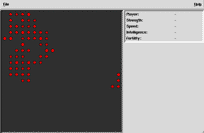 Installing the game is very easy. Simply copy the three files available below into a single location. Once X Window is running, launch the program from your terminal and you should be presented with the game board shown on your right. When you are ready to begin playing, select File->Start Game. When all players have selected Start Game the game will begin. Diagnostic and informational messages will appear in the terminal.
Use the following commands at your shell prompt to launch the game as the server and client respectively.
% ./evwar.pl
% ./evwar.pl server_hostname
The server must be running before clients can connect by specifying the server's hostname as an argument to the program.
Players take turns moving, reproducing, and attacking. To view the attributes of a blob, move your mouse cursor over the blob and its strength, speed, intelligence, and fertility will appear in the upper-right. When it is your turn, you will see hatch marks appear when your mouse cursor is over a blob, indicating where a blob may move to. A selected blob will be enclosed within a white square.
| Moving |
Click on one of your blobs and then click on an empty location that your blob may move to. Your blob will move to the new location. |
| Attacking |
Click on one of your blobs and then click on an enemy blob which is at a location that your blob may move to. One of the two blobs will be destroyed. |
| Mating |
Click on one of your blobs and then click on another of your blobs that your blob may move to. The two parent blobs will be replaced by one, two, or three child blobs. |
| Cloning |
Click on one of your blobs and then click on the same blob again. A new blob will be created in an adjacent (horizontal, vertical, and diagonal) empty location which is a either a very close clone of the original, or a dead stone. |
| Cancelling |
If you accidentally click on a blob and then change your mind, click your middle mouse button (command-click for Macintosh users) anywhere to deselect your blob. |
| evwar.pl |
The main application. |
| RPC.pm |
A slightly modified version of Siriam Srinivasan's RPC module. |
| Msg.pm |
A slightly modified version of Siriam Srinivasan's Msg module. |
Last updated: